
AI 3D model generators are transforming how 3D assets are created. These tools use advanced technologies like Neural Radiance Fields (NeRFs), diffusion models, and machine learning to turn simple inputs – like text prompts or 2D images – into detailed 3D models in seconds. They save time, reduce costs, and make 3D modeling accessible to non-experts.
Key Points:
- Speed: Models are generated in 15–30 seconds, compared to days with traditional methods.
- Market Growth: Valued at $1.63 billion in 2024, projected to hit $9.24 billion by 2032.
- Applications: Used in gaming, architecture, e-commerce, product design, and education.
- User Types: Ideal for game developers, marketers, architects, and even hobbyists using tools like Live3D AI.
- Top Tools: Platforms like 3DAI Studio, Rodin AI, and Meshy offer diverse features for different needs.
AI 3D model generators are not replacements for human creativity but powerful tools to speed up workflows and automate repetitive tasks. For the best results, combine high-quality inputs with manual refinement.
I Tested Every 3D AI Generator, Here‘s What You Need To Know
sbb-itb-8421839
How AI 3D Model Generators Work
AI 3D model generators are changing the game by turning simple inputs into detailed 3D assets with impressive speed. Let’s break down the technologies behind them, how they handle inputs, and what features you should look for when choosing one.
Technologies That Drive AI 3D Model Generators
AI 3D model generators combine several cutting-edge technologies to deliver their results. For instance, Neural Radiance Fields (NeRFs) can reconstruct realistic 3D scenes from 2D images by analyzing how light interacts with objects. NVIDIA’s Instant NeRF takes this a step further, offering over 1,000x faster processing and training in just seconds using a handful of photos.
Diffusion models work by learning from vast 3D datasets. They first create a rough model and then refine it for higher resolution. Generative Adversarial Networks (GANs) improve quality by having two networks compete to perfect the output. Meanwhile, Signed Distance Function (SDF) networks define the shape of objects during the synthesis stage.
For understanding natural language prompts, transformer models step in to identify materials and structural details. On top of that, computer vision and monocular depth estimation help the AI figure out depth and spatial relationships. Finally, mesh optimization ensures the final model has clean topology, UV maps, and appropriate polygon counts for professional use.
These technologies work together to turn diverse inputs into polished 3D outputs, much like how you can turn ideas into reality with Gen AI tools for marketing.
Input Methods and Output Formats
AI 3D generators are versatile in the types of inputs they accept. For quick ideation, text prompts are a go-to option, especially for creating objects that don’t yet exist. On the other hand, 2D images are ideal for replicating real-world items, making them perfect for e-commerce or product visualization. Combining these methods often yields the best results: start with a detailed 2D reference image, then refine the model using text-based adjustments.
Providing multiple angles (front, side, back) significantly enhances the accuracy of the 3D mesh and reduces errors. With text prompts, specificity is key – clear descriptions with precise material and functional details produce better results than vague aesthetic terms.
When it comes to outputs, most tools export models in widely used formats like OBJ (geometry), FBX (animation and rigging), STL (3D printing), GLB/GLTF (web and AR applications), and USD/USDZ (AR and collaboration platforms). Additionally, many generators create full PBR (Physically Based Rendering) texture maps, including albedo, normal, roughness, and metallic layers, which integrate seamlessly into game engines and texturing tools.
The range of input and output options plays a major role in determining how flexible and capable a generator is.
Features to Consider
When choosing an AI 3D model generator, focus on tools that deliver clean, professional results. For example, Luma Labs Genie creates quad-based meshes, which simplify tasks like subdivision and UV mapping – ideal for professional workflows. Smart remeshing features are also valuable, as they adjust triangle and quad counts to balance detail and performance, especially for mobile or web applications.
Support for PBR maps is a must for compatibility with professional pipelines, while auto-rigging features add skeletal structures for immediate animation. Integration with tools like Blender, Unity, Unreal Engine, and Maya can also save time by streamlining your workflow.
However, even the best AI tools have limitations. Transparent or reflective surfaces like glass and chrome often confuse depth estimation, requiring manual cleanup. Post-processing in traditional software is often necessary for tasks like retopology or UV adjustments. If you’re preparing models for 3D printing, check for irregularities like “AI bumps” (small, unwanted protrusions) and ensure the model has a flat base for proper adhesion to the print bed.
Top AI 3D Model Generators in 2026
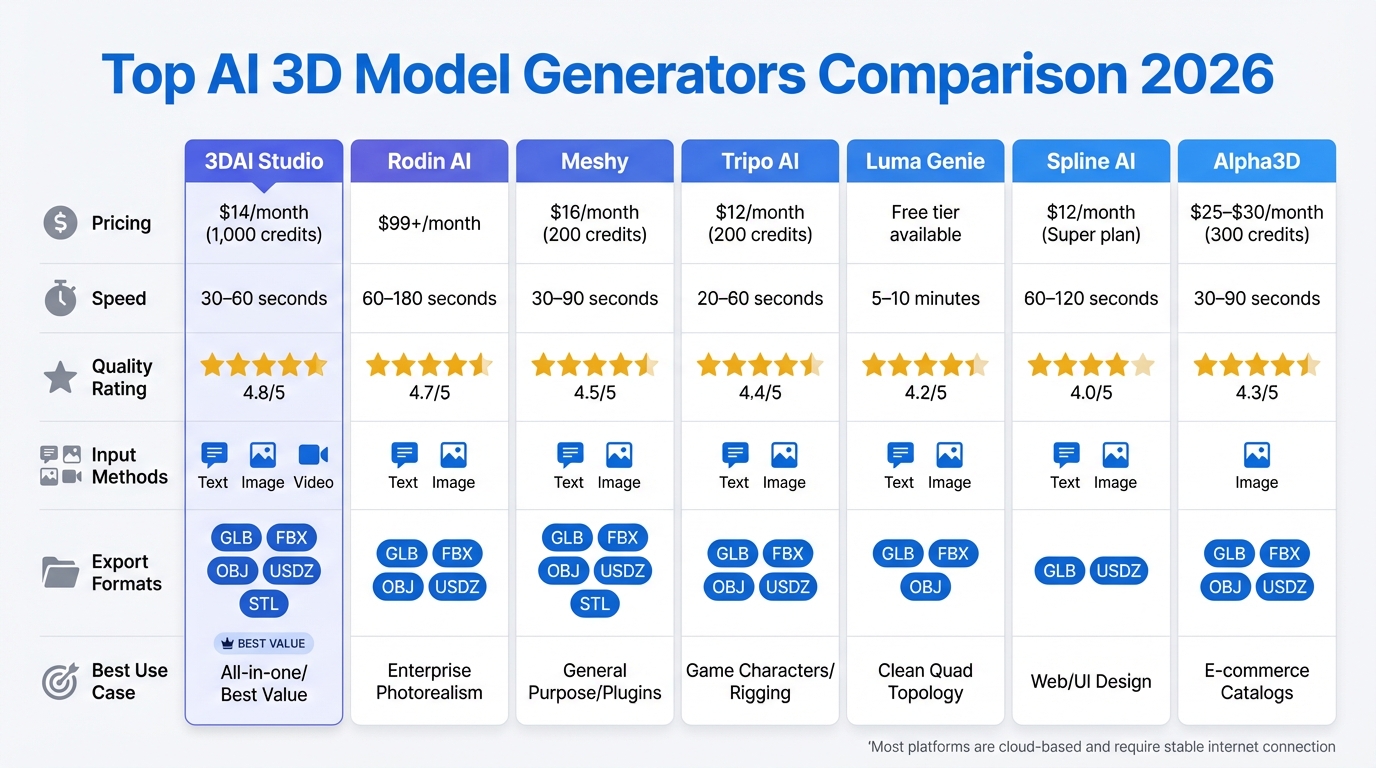
AI 3D Model Generator Comparison: Features, Pricing, and Performance
With a growing number of platforms available, choosing the right 3D model generator depends on your specific needs – whether it’s photorealistic rendering, game assets, or quick prototyping. Here’s a rundown of ten standout AI 3D model generators, covering pricing, speed, and ideal use cases.
10 Leading AI 3D Model Generators
3DAI Studio combines multiple AI engines like Meshy, Rodin, Tripo, and CSM under one subscription. This flexibility allows users to switch engines based on their project – be it characters, products, or environments – improving success rates by 60–70% compared to single-engine tools. At $14/month (1,000 credits), it supports text-, image-, and video-to-3D generation, making it a top pick for professionals and agencies.
Rodin AI (Hyper3D) is tailored for enterprise users, delivering photorealistic models with precise 4K PBR textures. Starting at $99/month, it generates models in 60–180 seconds, earning a quality rating of 4.7 out of 5. It’s perfect for high-end commercial projects.
Tripo AI excels in creating clean quad-based topology with auto-rigging for characters, making it easy to integrate models into Unity or Unreal Engine. With speeds of 20–60 seconds, plans start at $12/month (200 credits), and it boasts a quality score of 4.4 out of 5.
Meshy supports plugins for Blender and Unity, making it ideal for concept artists and rapid prototyping. Models are generated in 30–90 seconds, with a quality rating of 4.5 out of 5. Priced at $16/month (200 credits), it uses a single AI model. As developer Tim Karlowitz from Karlowitz Studios shared:
"Image to 3D is my go-to for client work. They send a sketch, I send back a 3D model 5 mins later. Clients think I’m a wizard."
– Tim Karlowitz, Developer & Creative, Karlowitz Studios
Luma AI (Genie) stands out with its free tier and NeRF scanning capabilities. It produces quad-based meshes that simplify UV mapping and subdivision. Models take 5–10 minutes to generate, with a quality score of 4.2 out of 5.
Spline AI caters to web designers and UI/UX professionals, providing lightweight models optimized for web performance. Generation speeds range from 60–120 seconds, and pricing includes a free tier, a $12/month Super plan, and AI credits at $10 for 1,000 usages. It has a quality rating of 4.0 out of 5.
Alpha3D focuses on automating high-volume 3D catalog creation for e-commerce. Plans range from $25–$30/month (300 credits).
Masterpiece X offers an intuitive conversational AI interface, enabling users to create 3D models with simple prompts.
DeepMotion specializes in AI-driven motion capture and animation, perfect for character workflows.
3DFY is designed for bulk 3D model generation, targeting gaming and AR/VR industries. It also provides API access for developers.
Comparison Table of AI 3D Model Generators
| Tool | Pricing (Monthly) | Speed | Quality Rating | Input Methods | Export Formats | Best Use Case |
|---|---|---|---|---|---|---|
| 3DAI Studio | $14 (1,000 credits) | 30–60s | 4.8/5 | Text, Image, Video | GLB, FBX, OBJ, USDZ, STL | All-in-one/Best Value |
| Rodin AI | $99+ | 60–180s | 4.7/5 | Text, Image | GLB, FBX, OBJ, USDZ | Enterprise Photorealism |
| Meshy | $16 (200 credits) | 30–90s | 4.5/5 | Text, Image | GLB, FBX, OBJ, USDZ, STL | General Purpose/Plugins |
| Tripo AI | $12 (200 credits) | 20–60s | 4.4/5 | Text, Image | GLB, FBX, OBJ, USDZ | Game Characters/Rigging |
| Luma Genie | Free tier available | 5–10m | 4.2/5 | Text, Image | GLB, FBX, OBJ | Clean Quad Topology |
| Spline AI | $12 (Super plan) | 60–120s | 4.0/5 | Text, Image | GLB, USDZ | Web/UI Design |
| Alpha3D | $25–$30 (300 credits) | 30–90s | 4.3/5 | Image | GLB, FBX, OBJ, USDZ | E-commerce Catalogs |
As one 3D hobbyist, Noah Böhringer, shared:
"I find myself switching between tools depending on if I need a character or a chair. No single tool does it all perfect yet."
– Noah Böhringer, 3D Hobbyist
Most of these platforms are cloud-based, requiring only a standard laptop and a stable internet connection. While generation speeds are fast – often within 30–60 seconds – expect to spend 15–30 minutes on manual cleanup for assets intended for high-end production.
Applications and Use Cases
AI 3D model generators are shaking up industries by streamlining workflows, from gaming studios crafting virtual worlds to architects visualizing designs in record time. The market for AI-generated 3D assets was valued at $1.63 billion in 2024 and is expected to skyrocket to $9.24 billion by 2032. This growth is fueling adoption across a variety of creative and operational sectors.
Industries Using AI 3D Model Generators
The gaming and entertainment sector currently leads the charge, claiming 33% of the market share. Gaming studios use these tools to quickly create immersive environments, while architects transform 2D plans into detailed 3D walkthroughs. For instance, Sunny Valley Studio uses text prompts to generate props and landscapes for Unity games, cutting down on repetitive tasks. Epic Games reported a 30% boost in productivity and a 25% reduction in production costs after incorporating AI-powered tools into their workflows. NVIDIA’s advancements have made near-real-time text-to-3D generation a reality, giving creators unprecedented speed and efficiency.
In architecture and construction, which accounts for 27.1% of the market, AI tools are revolutionizing the design process. Firms now convert 2D floor plans into interactive 3D models in minutes, saving days of manual labor and enabling quicker design iterations.
E-commerce and retail are leveraging image-to-3D workflows to create photorealistic product models for augmented reality shopping and virtual showrooms. A single product photo can be turned into a fully interactive 3D asset, eliminating the need for costly photography setups. In product design and manufacturing, AI tools reduce design time by as much as 70%. Solutions like PrintPal’s Image-to-CAD tool have slashed design-to-manufacturing timelines by up to 90%. Companies like Boeing and Caterpillar use these tools to speed up prototyping and simulate product performance before production.
In healthcare, AI generates anatomical models from patient data to assist in surgical planning and training. Meanwhile, robotics teams use virtual environments to train autonomous systems without physical testing. Even education is embracing these tools, with 78% of organizations incorporating AI into their workflows. Educators are using them to teach 3D printing and extended reality (XR) development.
| Industry | Application | Key Benefit |
|---|---|---|
| Gaming | Character & Prop Creation | Speeds up world-building and reduces manual work |
| Architecture | Rapid Prototyping | Converts 2D plans into 3D models in minutes |
| Product Design | Concept Visualization | Cuts design-to-manufacturing time by up to 90% |
| E-commerce | Virtual Showrooms | Transforms 2D photos into 3D product views |
| Healthcare | Anatomical Modeling | Supports surgical planning and training |
Practical Examples of AI 3D Model Applications
Real-world examples highlight the transformative potential of AI in 3D modeling. In January 2025, Bambu Lab introduced PrintMon Maker on its MakerWorld platform, enabling users to generate 3D-printable fantasy creatures from simple text or image prompts. This tool has made 3D printing accessible to hobbyists without traditional modeling expertise. Similarly, Nike has tapped into AI to design innovative shoe concepts, while 3DCeram uses AI to automate additive manufacturing for industrial components.
In December 2024, Backflip – a startup founded by the team behind Markforged – raised $30 million in Series A funding to develop AI tools for creating high-quality, print-ready 3D models. Gaming developers have also seen major benefits, with 75% reporting increased user engagement after integrating AI-generated assets into AR and VR experiences. Among companies using AI in product design, 75% noted significant reductions in design time, and 95% emphasized the importance of product visualization in their operations.
While these tools are powerful, they still require some manual refinement. This has led to the rise of specialized roles like clean-up artists and AI pipeline specialists. Instead of replacing human creativity, AI acts as a co-pilot, handling tedious tasks like retopology and UV mapping so artists can focus on the creative aspects of their work.
Best Practices for Using AI 3D Model Generators
AI 3D model generators can significantly speed up the creation of base meshes, reducing initial work time by as much as 80%. However, the process still requires a human touch for refinement, rigging, and final polishing. As Tim Karlowitz, Developer & Creative at Karlowitz Studios, aptly puts it:
"Use it for blockouts and reference, don’t expect final polish immediately. It’s a helper, not a replacement."
How to Choose the Right Tool
Selecting the right AI 3D model generator depends on your project requirements, budget, and technical skills. For quick, straightforward results, cloud-based options like Meshy’s free tier or Spline AI’s $12/month Super plan are worth considering. If you’re working on production-level projects, tools like 3DAI Studio ($14–$29/month) or Rodin Gen1 (approximately $0.75 per generation) offer greater precision, which is especially useful for tasks like 3D printing. Keep in mind, even the most advanced tools still need human intervention for the final touches.
For those with technical expertise and a tight budget, local solutions like Hunyuan 3D in ComfyUI can provide more control and independence from server issues. However, these require a system with at least 12 GB of VRAM. If your system has around 6 GB of VRAM, enabling VRAM tiling and reducing image resolution to 256 px can help prevent crashes.
How to Improve Your Inputs for Better Results
The quality of the output is closely tied to the quality of your input. When using text prompts, be as specific as possible. For instance, instead of saying "metal chair", try "mid-century modern armchair with a brushed titanium frame and a matte black carbon fiber seat." Include details about materials, geometry, and functionality.
For image-to-3D workflows, ensure your images are clear and well-lit, with minimal shadows to avoid texture issues. Use neutral backdrops or digital masks (like SAM 2) to isolate objects from busy backgrounds. Aim for a resolution of at least 512 px, though 1024 px is better for capturing fine details. Providing multi-view inputs – such as front, three-quarter, and close-up shots – can improve accuracy. If you’re working with human models, use natural poses and avoid reflective or transparent surfaces, as these can confuse depth estimation.
The most effective approach often combines methods: start with a high-quality 2D reference image, convert it to 3D, and refine the result with targeted text adjustments. These steps can make integrating AI-generated models into your workflow much smoother.
Adding AI 3D Models to Your Workflow
Once you’ve optimized your inputs, the next step is to effectively integrate AI-generated models into your workflow. These models work best as starting points, forming the basis for a pipeline that includes AI-assisted concepting, manual refinement, and hybrid texturing. This approach can save you 40–60% of project time.
Make sure your chosen tool supports industry-standard formats like FBX, OBJ, GLB, or OpenUSD to ensure compatibility with software such as Blender, Maya, Unity, or Unreal Engine. Keep assets and their textures linked to avoid disruptions in your workflow.
Because results can vary, you may need to repeat prompts until you achieve a production-ready model. For 3D printing, consider slicing off a thin layer from the bottom of the model to create a flat surface for better build plate adhesion. Also, inspect the model for any "AI bumps" or irregularities that may require manual cleanup.
To maintain tool performance, use the latest browser versions (such as Chrome or Edge) and clear your cache regularly. Enable WebGL and hardware acceleration to avoid interface lag. Additionally, leverage camera metadata, like focal length, to ensure consistent scaling in your models.
Conclusion
Wrapping up the insights shared earlier, let’s revisit some key points and practical steps to help you make the most of AI 3D model generators.
AI-driven 3D model creation is reshaping workflows by slashing production times by 40–60% and cutting costs by as much as 100x. These tools can churn out over 10 concept variations quickly and automate base mesh creation, saving 30–60 minutes per asset. This allows AI to handle repetitive, time-consuming tasks, leaving artists free to focus on refining and perfecting the details.
Key Takeaways
Think of AI as a tool, not a replacement for human creativity. Cloud-based platforms like Meshy ($16/month) and 3DAI Studio ($14–$29/month) provide affordable starting points with free trials. For higher precision, Rodin (around $0.75 per generation) is a great option. If you prefer full control without subscriptions, local solutions like Hunyuan 3D are worth exploring.
Success with AI tools depends on the quality of your inputs and choosing the right platform. Specific prompts, such as "mid-century modern armchair with a brushed titanium frame," combined with multi-view image references, deliver far better results than generic descriptions. However, AI-generated assets are just the beginning – they’ll need manual adjustments for topology, UV mapping, and fine details to make them production-ready.
Next Steps
Start small. Experiment with low-risk projects like background props or environmental elements to test how these tools fit into your workflow. Use free tiers – such as Meshy’s 200 monthly credits – to explore capabilities without committing financially. Generate base meshes with AI, then refine them using tools like Blender, Maya, or ZBrush.
The industry is steadily moving toward image-to-3D workflows for improved geometric accuracy, and many AI tools now integrate directly with professional software. Whether you’re in game development, architecture, e-commerce, or 3D printing, these advancements mean you can create production-ready assets in just 15–30 minutes – compared to the traditional 3–5 days. By adopting these strategies, you can streamline every stage of your creative process and unlock new possibilities for your projects.
FAQs
How do AI 3D model generators improve efficiency compared to traditional 3D modeling methods?
AI-powered 3D model generators have transformed the modeling process, cutting down creation time to just minutes – a stark contrast to the hours or even days that manual methods often demand. These tools can interpret sketches, images, or even text prompts to quickly generate base models, offering creators a faster and more efficient way to get started.
Beyond just speed, these tools simplify repetitive tasks, freeing up artists to concentrate on the more creative aspects of their work rather than getting bogged down in tedious details. AI is particularly effective for generating background props, low-detail objects, and initial concept models. However, when it comes to intricate or highly detailed assets, manual refinement is often still necessary. In essence, AI generators are excellent for enhancing productivity, but they work best as a complement to traditional techniques rather than a complete replacement.
How can I ensure high-quality results when using AI 3D model generators?
To get the best results from AI 3D model generators, start by giving them clear and detailed inputs. Break down complex objects into smaller, manageable parts and describe each one precisely – whether you’re working on a prop, an environment, or a character. High-resolution reference images or carefully written text prompts can also help guide the AI to create exactly what you need.
Once the model is generated, take time to inspect it thoroughly. Check for clean topology, proper UV mapping, and optimized polygon counts. Remove any unnecessary faces, create level-of-detail (LOD) versions for better performance, and export the model in widely supported formats like FBX to ensure it works seamlessly with platforms like Unity or Unreal Engine. If you’re designing for the U.S. market, double-check dimensions using imperial units (like inches or feet) to ensure everything is scaled correctly.
Before finalizing, test the model in your target software or engine. Look out for issues like hidden faces, non-manifold geometry, or texture seams. Remember, AI tools are here to speed up your workflow – not replace it entirely. Be ready to iterate and refine as needed to produce polished, production-ready 3D models.
How can AI 3D model generators enhance workflows in industries like gaming and architecture?
AI-powered 3D model generators are transforming creative workflows by making tasks like concept creation, asset production, and iterative design faster and more efficient. Instead of starting from scratch, designers can use a simple text prompt or reference image to generate fully textured 3D models in formats like FBX or OBJ. These models are ready to be imported into popular tools such as Unreal Engine, Unity, Blender, or Revit, streamlining the entire process and freeing up time to focus on refining ideas.
Once these models are brought into existing software, they can be fine-tuned with precise details like dimensions or structural specifications, making them versatile for projects ranging from game development to architectural design. Automated tools or APIs can even update the models dynamically to reflect design changes, cutting down on repetitive tasks and minimizing wasted effort. By speeding up workflows by 5–10 times, AI 3D model generators allow teams to deliver high-quality assets more quickly while still maintaining full creative control.