
AI motion graphics are transforming animation by automating tasks like keyframing, rotoscoping, and motion tracking. This shift saves time, cuts costs, and opens doors for smaller teams to produce high-quality visuals. Here’s what you need to know:
- Market Growth: Motion graphics are projected to reach $1.4 billion by 2025, with AI-driven video production growing from $1.4 billion in 2022 to $4.6 billion by 2027.
- Efficiency Gains: AI tools reduce production timelines by up to 60% and costs by 25%, with 65% of marketers planning to increase animation budgets.
- Key Tools: Platforms like Runway ML, Midjourney, and Adobe Firefly dominate the scene, offering features like text-to-motion, real-time rendering, and seamless integration with creative workflows.
- Emerging Trends: Text-to-motion technology, real-time collaboration, and AI-driven generative design are reshaping how animations are created.
AI tools are becoming essential for motion designers, enabling faster workflows and expanding creative possibilities. Whether you’re a solo creator or part of a team, integrating these tools can streamline your projects and enhance output quality.
Create PROFESSIONAL Motion Graphics with AI (FULL Tutorial)
Benefits and 2025 Trends
AI motion graphics are transforming the industry with three key advantages: faster turnarounds, lower production costs, and easier accessibility for anyone with a creative vision. Let’s explore these benefits through the lenses of time and cost savings, generative design, and real-time collaboration.
Time and Cost Savings
AI is revolutionizing time-intensive tasks like frame-by-frame editing. Processes such as rotoscoping, object tracking, keyframing, and background removal that once took hours can now be completed in minutes. AI-powered motion tracking and scene optimization cut production time by up to 60%. Plus, AI rotoscoping tools boast an accuracy rate of 95% or more, surpassing the 80–90% accuracy achieved manually.
The impact is clear: roughly 60% of motion designers report being able to take on more projects, boosting their revenue. AI integration has driven a 40% productivity increase and slashed production timelines by 25%. The numbers speak for themselves – AI-driven video production is expected to grow from $1.4 billion in 2022 to $4.6 billion by 2027.
Generative Motion Design
Efficiency isn’t the only game-changer. AI is also sparking a creative transformation with text-to-motion technology. Multimodal AI models now turn simple descriptions into fully animated visuals. Instead of painstakingly keyframing every element, designers can input something like, "a logo that morphs into liquid gold and splashes across the screen", and the AI delivers multiple variations in seconds.
This capability goes beyond basic animations. AI can now generate audio-reactive visuals that align motion with music tempo, speech rhythms, and emotional tones. It also supports data-driven motion, where animations adjust in real time based on live inputs like stock prices, trending topics, or weather conditions.
"We’re entering a cinematic renaissance where words become moving pictures. Designers can prototype emotions in seconds instead of days." – Dr. Hiroshi Tanaka, Researcher at Tokyo Institute of Creative AI
This leap in creativity is paving the way for more dynamic, real-time collaboration.
Real-Time Collaboration and Rendering
AI-powered, cloud-based platforms are closing the "render gap" that used to slow down creative processes. With advances in neural style transfer and AI processing, designers can now apply cinematic effects and see results instantly. What once required hours of rendering can now be achieved in real time, enabling rapid experimentation. Tools like Runway ML allow teams to collaborate remotely without needing expensive, high-performance hardware.
Seventy-five percent of motion designers report improved workflow efficiency thanks to AI tools, and 71% use these tools daily.
"The future of design won’t be static or scripted. It will be alive, responsive, and emotionally intelligent." – Andreas Müller, Creative Technologist at Meta Reality Labs
As AI takes over technical execution, motion designers are stepping into roles as creative directors, focusing on guiding and curating AI-generated content rather than manually crafting every frame.
Best AI Tools for Motion Graphics
In 2025, the motion graphics scene is dominated by three standout platforms: Runway ML, Midjourney, and Adobe Firefly. Each tool brings its own strengths to the table, making them indispensable at different stages of a motion graphics project. Together, they form a bridge between creative brainstorming and polished production.
Runway ML for Video Editing and VFX
Runway’s Gen-4.5 model is leading the charge in the Artificial Analysis Text to Video benchmark, boasting an impressive 1,247 Elo points. Its advanced physical accuracy ensures that objects move with lifelike weight and momentum, creating cinematic-quality visuals. Whether it’s flowing liquids or intricate character collisions, Runway delivers results that feel authentic. The platform also supports multiple generation modes, such as Image to Video, Keyframes, and Video to Video.
"Runway’s generative video innovation combined with Adobe’s trusted pro workflows will help creators and brands expand their creative potential and meet the growing demands of modern content."
– Ely Greenfield, CTO and Senior VP, Digital Media, Adobe
Runway Gen-4.5 stands out for its ability to handle tasks like instant background removal, relighting, and adding elements – all through simple text prompts. These features eliminate the need for time-consuming manual rotoscoping, making it a game-changer for video editing and VFX work.
While Runway ML excels in creating realistic visual effects, Midjourney focuses on shaping the visual identity of a project.
Midjourney for Concept Art and Assets
Midjourney is a powerhouse for previsualization, enabling designers to quickly produce moodboards, concept art, and style frames. Its strength lies in generating photorealistic textures and stylized illustrations, which help define the look and feel of animated sequences. By setting the tone and style early on, Midjourney streamlines the creative process, making it easier to transition into full-scale animation.
Once the visual concepts are locked in, Adobe Firefly steps in to handle editing and production with precision and ease.
Adobe Firefly and After Effects Integration
Adobe Firefly integrates seamlessly with top-tier generative AI models, enhancing creative workflows across the board. As of December 2025, Runway’s Gen-4.5 has been directly integrated into Adobe Firefly, making it part of the Adobe Creative Cloud ecosystem. The Firefly Video Editor offers a browser-based, multi-track timeline that combines text-based editing with traditional timeline controls, giving users complete control over pacing and precision.
With features like Prompt to Edit, powered by Runway’s Aleph, users can tweak clips with simple text commands. For example, typing "remove the person on the left" or "zoom in slightly" applies instant changes. The Camera Motion Control feature replicates cinematic movements using a start frame and reference video for guidance.
Firefly generates native 4MP photorealistic images, and with the help of Topaz Astra, it can upscale outputs to 1080p or 4K. It also supports text prompts in over 100 languages, making it versatile for creators worldwide.
Adobe’s integration extends further with updates to After Effects and Premiere Pro. After Effects 25.2, released in April 2025, now features a high-performance preview engine and Animated Environment Lights, which use video data to illuminate 3D models. Meanwhile, Premiere Pro’s Generative Extend tool allows users to add extra 4K frames at the beginning or end of clips, resolving timing issues without breaking a sweat. This tool is currently available at no extra cost.
Adobe is also running a special promotion through January 15, 2026, offering unlimited image and video generations for Firefly Pro, Premium, and select credit plan subscribers. Pricing starts at $9.99/month for Standard plans, $19.99/month for Pro, and $199.99/month for Premium plans.
| Tool | Primary Strength | Key 2025 Feature | Best For |
|---|---|---|---|
| Runway ML | Realistic physics & motion | Gen-4.5 with lifelike dynamics | Complex VFX and cinematic scenes |
| Midjourney | High-quality concept art | Photorealistic textures & moodboards | Previsualization and style frames |
| Adobe Firefly | Workflow integration | Prompt to Edit & Camera Motion Control | End-to-end creative assembly |
sbb-itb-8421839
AI Motion Graphics Tools Comparison
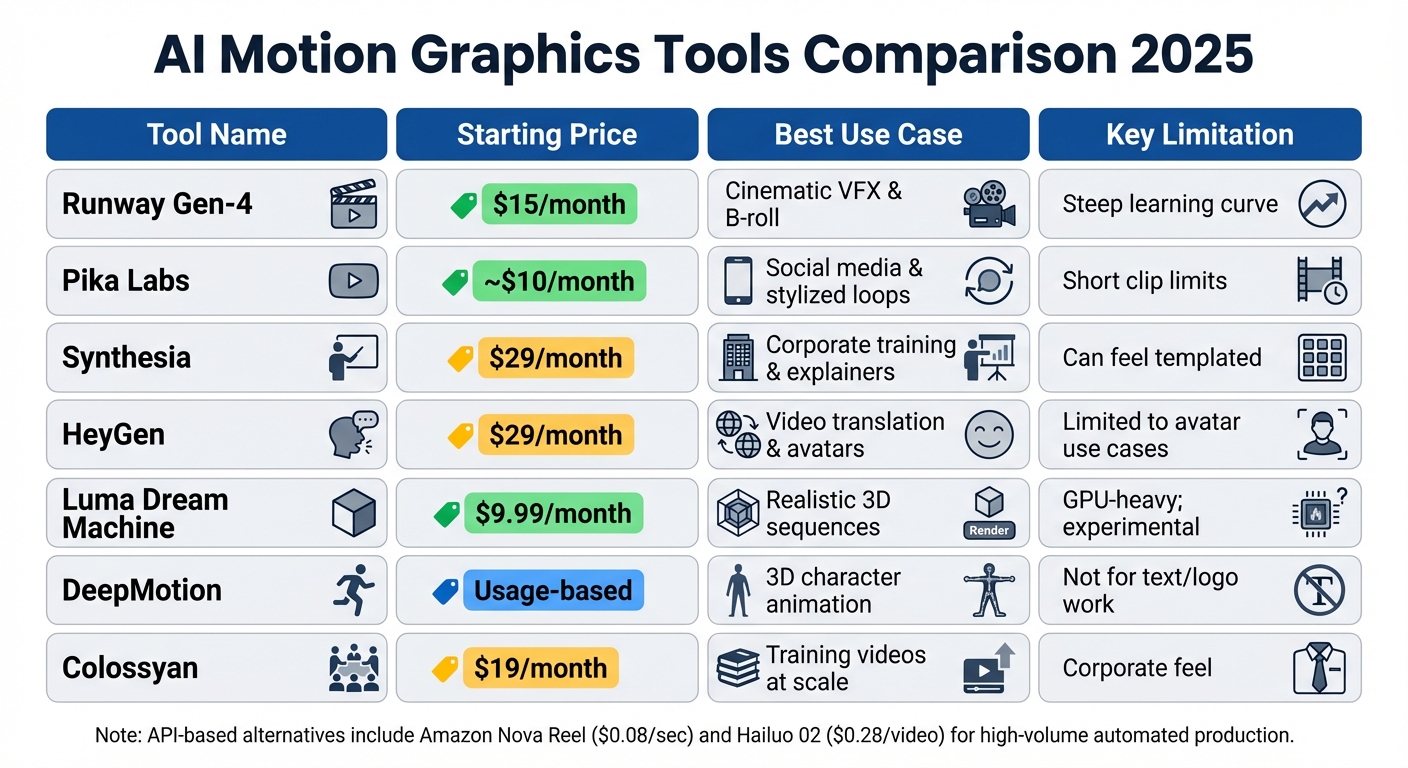
AI Motion Graphics Tools Comparison 2025: Features, Pricing and Best Use Cases
The growing influence of AI in motion graphics has brought a variety of tools to the forefront, catering to different project demands, budgets, and technical expertise. Here’s a closer look at some of the most popular options available in 2025.
When selecting an AI motion graphics tool, it’s all about balancing priorities like speed, quality, and creative control. From budget-friendly software to advanced cinematic suites, there’s something for everyone.
Runway Gen-4 leads the high-end market with its powerful physics simulation and post-generation editing features. While it offers impressive capabilities, it does come with a learning curve and starts at $15 per month for Standard plans. On the other hand, Pika Labs provides a more affordable and user-friendly option at around $10 per month, perfect for creating quick, stylized loops without the complexity of professional-grade tools.
For corporate training and localized video content, Synthesia and HeyGen are standout choices. Both start at $29 per month and eliminate the need for traditional film crews and voice actors. Synthesia supports over 140 languages and boasts a library of more than 230 AI avatars, while HeyGen is praised for its natural body movements and precise lip-sync capabilities. However, both can feel somewhat “templated,” making them less ideal for cinematic projects.
If you’re working on character animation, DeepMotion is a specialized tool that transforms 2D video into 3D motion capture data, saving time by bypassing manual keyframing. It’s particularly useful for game development and 3D animation but isn’t suitable for text or logo design. Meanwhile, Luma Dream Machine, with its Lite plan starting at $9.99 per month, focuses on creating realistic 3D sequences using neural rendering and highly accurate physics. However, its GPU-heavy and experimental nature may not suit every workflow.
Here’s a quick comparison of some leading tools:
| Tool | Starting Price | Best Use Case | Key Limitation |
|---|---|---|---|
| Runway Gen-4 | $15/mo | Cinematic VFX & B-roll | Steep learning curve |
| Pika Labs | ~$10/mo | Social media & stylized loops | Short clip limits |
| Synthesia | $29/mo | Corporate training & explainers | Can feel templated |
| HeyGen | $29/mo | Video translation & avatars | Limited to avatar use cases |
| Luma Dream Machine | $9.99/mo | Realistic 3D sequences | GPU-heavy; experimental |
| DeepMotion | Usage-based | 3D character animation | Not for text/logo work |
| Colossyan | $19/mo | Training videos at scale | Corporate feel |
For developers and marketers handling high-volume video production, API-based tools like Amazon Nova Reel ($0.08 per second) and Hailuo 02 ($0.28 per video) prioritize speed and seamless integration. These tools are ideal for automated content pipelines and programmatic video generation, particularly in social media campaigns. While they trade off some creative flexibility, their efficiency makes them a solid choice for large-scale projects.
This range of tools demonstrates how AI is reshaping motion graphics, providing tailored solutions for a variety of creative and practical needs.
Techniques and Practical Tips
Let’s dive into some practical approaches that can fine-tune your workflow, building on the tools we’ve already discussed.
Combining Multiple AI Tools
Pairing specialized AI tools can elevate both the quality and efficiency of your projects. For example, you could create static visuals with Midjourney or Stable Diffusion, bring them to life with animation tools like Runway ML or Luma Dream Machine, and then refine everything in Adobe After Effects.
A great example of this approach comes from Motion The Agency, which in January 2026, used Midjourney during live client calls to generate visual references in real time. This not only sped up approvals but also streamlined feedback, ensuring everyone was on the same page before production even began. By training AI models with brand guidelines, you can maintain consistent logos, colors, and typography across projects.
Here’s how you might structure a workflow using multiple tools:
- Use ChatGPT for storyboarding.
- Generate voiceovers with ElevenLabs.
- Assemble and edit footage in a dedicated video editor.
If you’re working on character animation, tools like DeepMotion can transform 2D video footage into 3D motion capture data. This eliminates the need for time-consuming manual keyframing, making professional-grade animation accessible and faster.
Once you’ve established your AI workflow, it’s important to ensure your technical setup can handle the demands of these tools.
Hardware and Software Setup
After defining your creative process, your hardware and software choices become critical for smooth production.
Local vs. Cloud-Based Platforms:
Decide whether to use local setups or cloud-based platforms based on your project’s needs. Tools like Runway ML and Kapwing operate in the cloud, which means you don’t need a high-end machine to create professional motion graphics. This is especially helpful if you’re working on a budget or just starting out.
Hardware Considerations:
For GPU-heavy tools like Luma Dream Machine, a powerful graphics card is essential for handling AI rendering and 3D motion locally. If your hardware isn’t up to the task, cloud rendering services can step in. Meanwhile, tools like Adobe After Effects benefit from a robust multi-core CPU to ensure smooth compositing and real-time previews.
Software Integration:
Seamless integration between tools can save hours of effort. Platforms that connect directly with Adobe Creative Cloud reduce the need for manual file conversions and asset management. AI plugins for After Effects, such as Rotoscope AI and Content-Aware Fill, can automate tedious tasks like object removal, cutting production time by as much as 70%. For quick 3D motion loops, browser-based tools like Spline AI are a lightweight alternative that doesn’t require hefty installations.
"AI-driven tools are revolutionizing After Effects workflows, allowing motion graphics artists to automate repetitive tasks and focus on creative aspects." – Noble Desktop Expert
Finally, tailor your tools to fit your project’s specific needs. For instance, you can use low-resolution drafts from Pika Labs for quick client storyboarding, then move to higher-resolution renders with more resource-intensive tools once the concept is approved.
Conclusion and What’s Next
AI has reshaped motion graphics by replacing time-consuming manual keyframing with automated, smarter workflows. Tools like Runway ML, Midjourney, and Adobe Firefly have made high-end production more accessible, allowing solo creators and small teams to achieve results that once required massive budgets and large crews. This shift is opening doors to even more exciting developments in the future.
Looking ahead, AI is on track to become "digital cinematographers", capable of generating full cinematic sequences with lifelike motion and emotional depth – all from simple text prompts. Emerging technologies like neural rendering and scene-extension workflows are refining these capabilities, enabling creators to produce continuous, long-form content rather than isolated clips. These advancements highlight AI’s dual benefits: improving efficiency while expanding creative horizons.
To stay ahead, focus on mastering prompt engineering – the skill of crafting precise, detailed instructions for text-to-motion tools is becoming as critical as traditional design expertise. Start small by experimenting with one tool for a social media reel or quick prototype, then gradually incorporate it into larger projects. With 90% of companies already using or planning to adopt AI for video production, now is the time to integrate these tools into your workflow.
If you’re ready to explore these trends and tools in greater depth, check out AI Review Vault (https://aireviewvault.com). They provide in-depth reviews and insights on AI platforms for motion graphics, video creation, graphic design, and more – helping you make informed decisions for your next project.
FAQs
How does AI motion graphics save time and reduce costs in video production?
AI motion graphics is reshaping the production process by slashing costs and streamlining workflows. Tasks like keyframing and rendering, which once required significant manual effort, are now automated, cutting down on labor and reducing expenses across the board.
But it’s not just about saving money – it’s also about speed. Projects that used to take weeks can now be wrapped up in mere days or even hours. This faster turnaround helps creators meet tight deadlines and respond swiftly to shifting demands. By merging efficiency with creative possibilities, AI motion graphics is changing the game for video content production.
What are the top AI tools for creating motion graphics in 2025?
By 2025, AI tools have completely transformed motion graphics, allowing designers to produce stunning animations with unmatched speed and ease. With features like text-to-motion generation, automated keyframing, and real-time rendering, these tools have become a game-changer for businesses and content creators.
Here are some standout platforms making waves:
- Hera.Video: This platform turns static designs into professional animations, offering precise timeline controls for detailed edits.
- Runway Gen-2: Renowned for its realistic camera movements and advanced text-to-motion capabilities, it’s a favorite among creators aiming for cinematic results.
- Kaiber: Perfect for creating stylized, music-video-inspired loops, this tool excels in delivering quick rendering for visually striking content.
- Animoto AI: Tailored for marketers, it provides user-friendly templates and AI-powered transitions to craft polished promotional videos effortlessly.
From short social media clips to full-scale cinematic sequences, these tools are proving indispensable for creators and brands across the U.S. this year.
How is AI-powered text-to-motion transforming animation creation?
AI-driven text-to-motion technology is transforming the animation world by allowing creators to turn written descriptions into fully-realized animations. Instead of painstakingly animating each frame, you can simply write something like “a logo glides upward with a glowing effect,” and the AI takes care of the rest in just seconds. This approach not only slashes production time and costs but also makes it easier for designers to try out different ideas and variations.
Tools like Runway’s Gen-2 engine take this a step further, offering advanced features such as 3D lighting, stylized loops, and script-to-motion workflows. By automating repetitive tasks like kinetic typography and logo animations, these tools let animators concentrate on the bigger picture – crafting compelling stories and making creative decisions. If you’re on the hunt for the best AI animation tools, AI Review Vault provides detailed reviews and comparisons to help you choose the perfect fit.