
AI is changing how we reuse content. Instead of letting your blog posts, webinars, or podcasts fade into the archives, AI tools can transform them into multiple formats – like social media posts, video clips, or email newsletters – quickly and efficiently.
Here’s why this matters:
- Save Time: AI reduces editing and formatting time from hours to minutes.
- Reach More Audiences: Create platform-specific content (e.g., TikTok clips, LinkedIn articles).
- Cut Costs: Affordable tools replace the need for large creative teams.
How it works: AI tools use technologies like Natural Language Processing (NLP), machine learning, and generative AI to analyze your content and reformat it. For example, a webinar can turn into short social videos, blog posts, and infographics – all while keeping your brand consistent.
Popular tools include:
- OpusClip: Turns long videos into short clips for TikTok or Instagram.
- Canva: Resizes designs for different platforms and creates graphics.
- Descript: Edits videos by tweaking text transcripts.
- Castmagic: Converts podcasts into transcripts, show notes, and social posts.
Whether you’re a marketer or content creator, AI tools can help you produce more content, faster, without sacrificing quality. Let’s dive into how they work and which ones might be right for you.
Smartest Ways to Repurpose Content with AI in 2025
How AI Content Repurposing Tools Work
AI content repurposing tools take care of the hard work involved in transforming your content. Instead of spending hours editing videos, rewriting blog posts, or creating graphics from scratch, these tools automate much of the process. Understanding how they work can help you pick the right tool for your needs.
Core Technologies Behind AI Content Repurposing
At the heart of these tools are several advanced technologies that make repurposing seamless:
- Natural Language Processing (NLP): NLP allows AI to process and manipulate text in ways that feel natural. It powers tools that can transcribe spoken words into editable text, summarize long reports into bite-sized social media captions, or adjust the tone of your content – formal for LinkedIn, casual for Instagram.
- Machine Learning Algorithms: These algorithms predict what type of content will perform well. Tools like OpusClip and Vidyo.ai use highlight detection to scan lengthy videos, pinpointing the most engaging moments. Some even assign a "Virality Score" to help you gauge how well a clip might do on social media.
- Computer Vision and Facial Tracking: These technologies handle visual adjustments. For example, they can convert a horizontal YouTube video into a vertical TikTok clip by automatically resizing the frame and keeping the speaker centered.
- Generative AI: This technology enables features like text-to-video and text-to-speech. You can turn a blog post into a video complete with an AI avatar and synthetic voiceover – no need for a camera or microphone.
- Brand Knowledge Integration: Tools equipped with "Brand Kits" or "Brand Hubs" ensure your fonts, colors, logos, and tone are consistent across all repurposed content. This eliminates the inconsistencies that can arise when content is manually adapted for different platforms.
Here’s a quick look at how these technologies align with specific tools:
| Technology | Primary Function | Example Tools |
|---|---|---|
| NLP | Summarization, tone adjustment, transcription | ChatGPT, Claude, Descript |
| Machine Learning | Highlight detection, performance prediction | OpusClip, Vidyo.ai |
| Computer Vision | Auto-resizing, facial tracking | 2short.ai, Repurpose.io |
| Synthetic Speech | Text-to-speech, voice cloning | ElevenLabs, Colossyan |
| Generative Design | Text-to-image, resizing | Canva, Typeface |
These technologies come together to create a smooth, efficient workflow for content repurposing.
The AI Content Repurposing Workflow
AI tools follow a structured process to transform your original content into new formats. This workflow typically involves four stages:
- Input Your Source Content: Start by providing the tool with your content – whether it’s a blog post URL, a video file, or a podcast transcript. The AI scans the material to understand its structure, key points, and main message.
- AI Analysis and Extraction: The tool extracts the most important insights from your content. For video and audio, it generates a transcript that you can edit like a text document. It also identifies segments with high potential for engagement.
- Multi-Format Generation: Based on your settings – like target platform, tone, and length – the AI reimagines your content into multiple formats. For instance, a single webinar could become 30 short video clips, a LinkedIn article, an email newsletter, and Instagram carousels. The AI also tailors content to fit platform-specific styles: YouTube content might include detailed explanations, while TikTok requires quick, attention-grabbing hooks.
- Human Review and Optimization: This is where you step in to fine-tune the AI’s output. You can verify facts, add your unique perspective, and ensure the content aligns with your brand voice. Data scientist Briana Brownell puts it best:
"The real skill isn’t in the AI tools themselves. It’s in knowing what’s worth preserving from your original work and how to coax that into new forms".
During this stage, teams often add interactive elements like captions or quizzes, adjust visuals for different aspect ratios, and schedule the content for publication.
Content Transformation Strategies
Once you understand how AI tools work, the next step is figuring out how to use them effectively. Different types of content call for different approaches – what works for a blog post might not suit a video or podcast. Here’s how to adapt each format for maximum impact.
Repurposing Written Content
Written content like blog posts, whitepapers, and reports is an excellent starting point for repurposing with AI. These materials can be turned into videos, social media posts, infographics, and more, saving time and effort.
For example, tools like Colossyan can transform documents – PDFs, PPTX, TXT, and DOCX – into video drafts using AI avatars and text-to-speech. Impressively, this tool supports over 80 languages.
On social media, platforms such as Typeface and Semrush‘s AI Social Content Generator can analyze a blog URL and automatically create platform-specific content. In May 2025, Typeface’s team demonstrated this by repurposing a single webinar into 10 distinct pieces, including blogs, e-books, and social posts, completing the task 10 times faster than their usual workflow.
AI writing assistants like Jasper and ChatGPT are particularly good at summarizing lengthy content. For instance, a 3,000-word whitepaper can be condensed into concise email snippets or social posts while retaining its core message. A single piece of cornerstone content can often generate 20 to 30 unique assets.
Visual tools like Canva simplify the process further. Features like "Magic Switch" instantly resize designs for various social formats, while "Magic Write" generates captions from existing text – all while keeping your brand’s style consistent.
"AI content repurposing goes beyond merely producing different versions of your content to help you scale up your content production while keeping the quality intact." – Akshita Sharma, Content Marketing Associate, Typeface
One crucial step in this process is to humanize the AI’s output. Always review drafts to add your unique insights, verify facts, and ensure the tone matches your brand voice.
Next, let’s explore how AI can simplify video content transformation.
Transforming Video Content
With video content making up 65% of all internet traffic, it’s one of the most valuable formats to repurpose. However, repurposing video often takes more effort than written content. A great starting point is using a transcript-first workflow: extract a clean transcript from your video to create blogs, show notes, or social media quotes. Tools like Descript allow you to edit videos by simply editing their transcripts.
For shorter clips, AI tools can automatically identify high-engagement moments and adjust aspect ratios for platforms like TikTok (9:16) or LinkedIn (1:1). These tools can even predict which segments will perform best on social media.
Transcripts can also be turned into blogs. You might opt for a verbatim transcript with a summary – ideal for interviews – or a fully rewritten article with added context and analysis. Embedding the original video in the blog post can increase reader engagement while offering an alternative way to consume the content. You can also repurpose YouTube videos into LinkedIn carousels by extracting 5–7 key points and turning them into visually appealing slides. For audio versions, AI can clean up filler words and enhance sound quality, making it easy to convert video segments into podcast episodes or audiograms.
Each platform has unique expectations. TikTok users prefer quick, attention-grabbing hooks, while LinkedIn audiences expect more in-depth, thoughtful insights.
"Repurposing works when ideas are adapted for the platform they’re published on, not just resized or rephrased." – Ina Toncheva, AI Content Marketing Strategist
Now, let’s look at how audio content can be repurposed just as effectively.
Leveraging Audio Content
Podcasts and audio recordings are packed with valuable insights but can be challenging to skim. Transcripts are essential for repurposing this type of content. AI tools can transcribe audio, identify key themes, and turn dense recordings into concise articles or show notes. For example, Descript not only transcribes but also removes filler words like "um" and "uh" to improve clarity.
Rather than repurposing an entire transcript, consider breaking it down by themes. AI can identify standalone topics and expand them into focused articles. Tools like NotebookLM can analyze long transcripts, pulling out key insights and recurring patterns. For in-depth audio content like webinars or research-heavy podcasts, Claude often outperforms ChatGPT, offering better nuance in extended transcripts.
You can also restructure transcripts into show notes or blog recaps, making podcast content more digestible. Analyzing transcripts for specific audience segments can help tailor the content to address their needs. Brands that refresh and redistribute content every 90 days have seen up to 4.8 times more AI citations than those that publish content only once. Optimizing audio content for structured text can also increase its chances of being cited in AI-driven search results.
"What you’re really doing is trying to make sure your content is prepared for citation, and you really want to become the answer that the models cite." – Alex Halliday, CEO, AirOps
Focus on transcribing timeless "how-to" topics or evergreen themes rather than short-lived news content. This ensures the repurposed articles retain their relevance over time, extending the life and reach of your audio content.
sbb-itb-8421839
Top AI Content Repurposing Tools
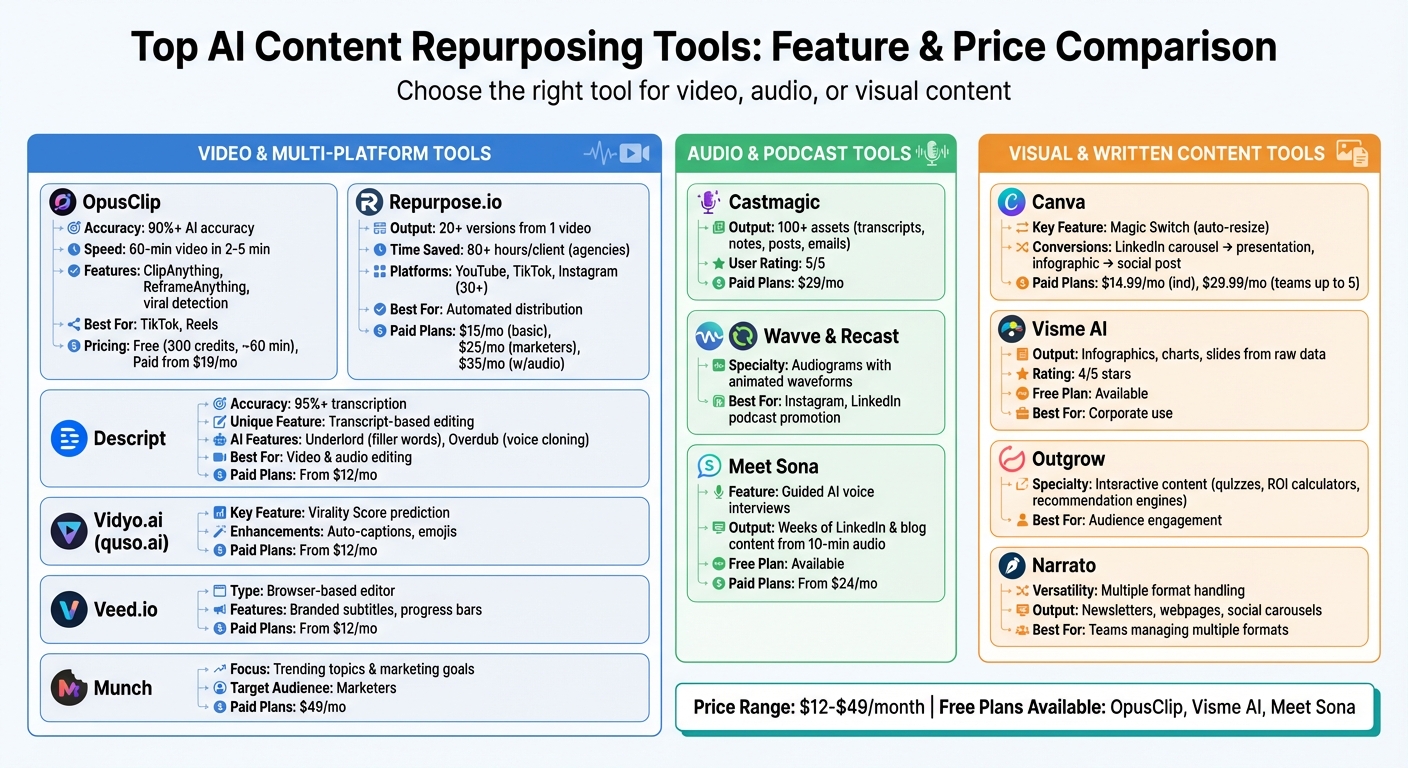
AI Content Repurposing Tools Comparison: Features, Technologies, and Pricing
With so many options available, finding the right tool for repurposing content depends on your specific needs. Some tools shine in video editing, others excel at audio transcription, and a few are geared toward creating visuals. Here’s a closer look at some of the best tools, categorized by their strengths.
Video and Multi-Platform Tools
OpusClip delivers impressive results with over 90% accuracy in identifying key moments from long-form videos. Its features, like "ClipAnything" and "ReframeAnything", are designed to automatically pinpoint viral content and reformat it for vertical platforms like TikTok and Instagram Reels. It processes a 60-minute video in just 2-5 minutes. Their free plan includes 300 credits (roughly 60 minutes of footage), and paid plans start at $19/month.
"OpusClip leads the video repurposing market with 90%+ AI accuracy and one-click automation." – OpusClip
Repurpose.io is all about automating distribution. It can take one master video and create over 20 formatted versions, automatically publishing them across platforms like YouTube, TikTok, and Instagram. This automation can save agencies over 80 hours per client. Plans start at $15/month, with a more feature-rich option for marketers at $25/month.
Descript stands out for its transcript-based editing system. You can edit videos by simply removing unwanted text from the transcript. Its AI features, like "Underlord" for cutting filler words and "Overdub" for voice cloning, make it a unique choice. With transcription accuracy exceeding 95%, plans start at $12/month.
Vidyo.ai (also known as quso.ai) predicts the performance of clips with its "Virality Score" and enhances engagement by adding captions and emojis. Similarly, Veed.io offers a browser-based editor for adding branded subtitles and progress bars, making it a go-to for polished, professional clips. Both tools start at $12/month.
Munch takes a different approach by analyzing trending topics and marketing goals to extract video segments. This tool is tailored for marketers and costs $49/month.
Audio and Podcast Tools
For those working with audio content, these tools offer powerful solutions, often doubling as video editing aids.
Castmagic transforms audio files into over 100 types of assets, including transcripts, show notes, LinkedIn posts, and email newsletters. Users rate it 5/5, and it’s priced at $29/month.
"We repurpose hundreds of hours of video and podcast content each month. With Castmagic, it feels effortless." – Ben, VP Content Ops, Yahoo Sports
Descript is also a strong contender in audio editing. It can generate social media clips, blog posts, and summaries directly from long recordings, making it a versatile option for creators. Repurpose.io complements this by automating publishing to over 30 platforms, with plans starting at $35/month.
Wavve and Recast specialize in creating "audiograms", which are short, engaging videos featuring animated waveforms and captions. These are particularly effective for promoting podcasts on platforms like Instagram and LinkedIn.
Meet Sona offers guided AI voice interviews, turning 10-minute audio recordings into weeks’ worth of LinkedIn and blog content. It has a free version and a paid plan starting at $24/month.
Visual and Written Content Tools
For those focused on visual or text-based assets, these tools take repurposing to the next level.
Canva simplifies design repurposing with its "Magic Switch" tool. This feature can resize a LinkedIn carousel into a presentation or transform an infographic into a social media post. Users love its intuitive interface and wide range of templates. Plans start at $14.99/month for individuals and $29.99/month for teams of up to five.
"Canva’s Magic Switch has saved us so much time in repurposing our designs. It’s a fantastic tool for content repurposing." – Samantha T., Graphic Designer
Visme AI is ideal for turning raw data and text into visuals like infographics, charts, and slides. It suggests layouts and icons based on your input but is noted to be pricier for smaller teams. While a free version is available, premium features are rated 4/5 stars, especially for corporate use.
Outgrow shifts the focus to interactive content, converting blog posts or topics into quizzes, ROI calculators, and recommendation engines. This approach helps brands create deeper audience engagement compared to static visuals.
For teams juggling multiple formats, Narrato is a versatile tool. It uses AI templates to convert long-form documents into structured newsletters, webpages, or social media carousels. It’s particularly praised for its ability to handle a wide range of formats, from press releases to web content.
Building an AI-Powered Content Repurposing Workflow
Creating a content repurposing workflow isn’t about using every tool available and hoping for the best. It’s about building a systematic process that turns one piece of content into multiple formats without overwhelming your team. The trick lies in starting with a strong foundation, picking tools that align with your needs, and automating repetitive tasks so your team can focus on strategy and quality. Start by assessing your current content to identify where repurposing can deliver the most value.
Step 1: Audit Your Existing Content
Before diving into tools, take a closer look at your existing content. Analyze your data to find high-performing assets – those blog posts, videos, or podcasts that consistently attract traffic, engagement, or downloads. These are your "Priority 1" pieces. Focus on in-depth content like long-form blog posts, webinars, podcasts, and whitepapers. For instance, a 3,000-word guide can be repackaged into LinkedIn posts, Instagram carousels, email campaigns, and short video clips. Similarly, a 60-minute webinar can yield blog summaries, audiograms, and TikTok snippets.
Evergreen content – think guides, how-tos, and reference materials – should take center stage. These pieces hold their value over time and can be refreshed and redistributed every 90 days. This is especially critical as AI tools like ChatGPT tend to prioritize citing recently updated content. Brands that refresh content quarterly report earning up to 4.8x more AI citations compared to those who publish once and leave it.
Step 2: Select the Right AI Tools
The tools you choose depend on your content types, your team’s skillset, and your budget. For video, platforms like OpusClip or Descript are great options. If you’re turning written content into social media posts, tools like Canva or AI writing assistants such as ChatGPT Plus (about $20/month) or Jasper (around $59/month) can help.
Integrating these tools with automation platforms like Zapier or Make can streamline your workflow by triggering actions automatically. Start small by focusing on a high-volume content type, such as repurposing blog posts into LinkedIn carousels. This allows you to fine-tune your prompts, templates, and brand voice before scaling up.
| Tool Type | Best For | Example Tools | Starting Price |
|---|---|---|---|
| Video Repurposing | Turning long videos into short clips | OpusClip, Descript | $12–$19/month |
| Audio & Podcasts | Creating transcripts and social assets | Castmagic, Descript | ~$29/month |
| Visual Content | Designing graphics and carousels | Canva, Visme AI | ~$14.99/month |
| Text Adaptation | Writing for multiple formats | ChatGPT Plus, Jasper | $20–$59/month |
| Automation | Connecting workflows | Zapier, Make | $9–$19.99/month |
Once you’ve chosen your tools, start building automation into your workflow for maximum efficiency.
Step 3: Automate and Optimize the Workflow
Automation is where the magic happens. Set up transformation rules for each platform. For example, ensure LinkedIn posts are professional and insight-driven, Instagram captions are casual and engaging, and Twitter posts stay short and to the point. Pre-configure your AI tools with these rules to avoid repetitive setup.
Use automation triggers to seamlessly connect your content management system with your repurposing tools. For instance, marking a blog post as "Published" in WordPress or Notion can automatically prompt your AI to generate social media posts, email summaries, and even video scripts. Tools like Repurpose.io can then distribute these assets across multiple platforms, eliminating the need for manual uploads.
Keep human oversight in the process. While AI can handle tasks like transcribing, drafting, and formatting, human review ensures accuracy, maintains brand voice, and adds unique insights. Teams that combine automation with human input often see a 3–5x boost in content output while reducing production time by 60–80%.
Lastly, track your results and refine your approach. Monitor which repurposed formats perform best in terms of engagement, conversions, or AI citations. Make it a habit to refresh and redistribute your top-performing content every 90 days. This keeps your content relevant and visible, as pages that aren’t updated quarterly are 3x more likely to lose AI search citations. Treat repurposing as a continuous process, not a one-time effort.
Conclusion
In 2026, repurposing content with the help of AI isn’t just useful – it’s a necessity. A significant 37% of B2B marketers struggle with repurposing content, 39% face challenges in creating enough material, and 55% find it tough to drive conversions. AI tools can take a single core piece of content and transform it into multiple formats, helping you connect with audiences across various platforms.
"To succeed and scale in 2026, you must maximize the value of every single idea." – aitrendstools.com
The real strength of AI lies in combining automation with human oversight. AI can handle repetitive tasks like transcribing, clipping, resizing, and formatting, giving you more time to focus on strategy and ensuring content quality. This not only increases output but also slashes production time, creating a more efficient content workflow.
Start by reviewing your existing content library to find evergreen pieces that consistently perform well. Choose AI tools tailored to your primary content format – whether that’s video, audio, or written content – and integrate automation into your processes. By adopting these tools, you’ll set yourself up for a content strategy that delivers long-term results. The tools are ready – are you prepared to amplify your impact?
FAQs
How do AI tools maintain brand consistency across different types of content?
AI tools help maintain brand consistency by integrating your brand’s style guide directly into their processes. With features like pre-designed templates, tone presets, and keyword libraries, these tools ensure that your content reflects your brand’s voice, colors, and messaging – whether it’s a blog post, social media update, video, or email.
They work by analyzing your original content, identifying key messages, and transforming them into various formats while keeping the style uniform. Many platforms also offer a human review stage, where editors step in to confirm the content aligns with your brand guidelines. If you’re weighing your options, AI Review Vault offers in-depth reviews to guide you in selecting tools that protect your brand identity while boosting content production.
What should I look for in an AI content repurposing tool?
When picking an AI content repurposing tool, it’s important to ensure it can handle the formats you work with – whether that’s blog posts, videos, podcasts, or social media snippets. Key features to look for include automatic transcription, summarization, and the ability to create content tailored to specific platforms, like LinkedIn posts or TikTok captions. A tool that aligns with your brand’s voice and style is essential for maintaining consistency across all your repurposed materials.
You’ll also want to check how well the tool integrates with your existing software. Compatibility with content management systems, video editing tools, or social media schedulers can save a lot of time and effort. Pricing is another factor to consider – many tools start at around $39 per month, with more advanced plans available for larger teams or higher content demands. Make sure the platform supports growth, prioritizes data privacy, and includes analytics to measure how well your repurposed content performs. For a deeper dive into available options, websites like AI Review Vault offer helpful insights and reviews to guide your choice.
How does AI identify the most engaging content for social media?
AI pinpoints engaging content for social media by diving into audience behavior and the features of the content itself. It starts by analyzing the original material – whether it’s a blog post, video, or podcast – and breaking it down into smaller segments like sentences, paragraphs, or video frames. Each of these pieces is then scored using predictive algorithms, which rely on historical engagement data such as likes, comments, shares, and watch time. This process helps predict how well each segment might perform across various platforms.
The system also takes into account factors like emotional tone, visual appeal, and platform-specific guidelines (think character limits or video durations). For instance, it might flag upbeat language or visually striking moments that are more likely to catch a viewer’s eye. Once the top-performing segments are identified, they’re fine-tuned into ready-to-post content, complete with captions, subtitles, or thumbnails. Over time, the AI refines its predictions by learning from real-time performance metrics, giving marketers a smarter way to drive engagement.